 Eatsboard
Less wondering. Better eating.
What are we eating today? Already planned.
Your AI Guide learns what you like, plans for you or your group, and turns it into recipes and a shopping list. You're in control.
For two, for the family — or just for you.
- Learns tastes, goals, and group profiles
- Plan → recipes → shopping list
- Edit anytime — with or without AI

Get started for free · Optional in-app purchases For iPhone · iOS 15 or later
Your Guide thinks ahead.
Your taste. Your goals. Your shared plan.
How Eatsboard helps
From daily wondering
to a plan for your week.
Find ideas, bring everyone's wishes together and remember every ingredient. Eatsboard connects it all in one flow.
- 01
Ask your Guide.
Share what you like and which ingredients you have. Your Guide finds suitable dishes or creates a personal recipe with you.
Meet your Guide - 02
Plan your week.
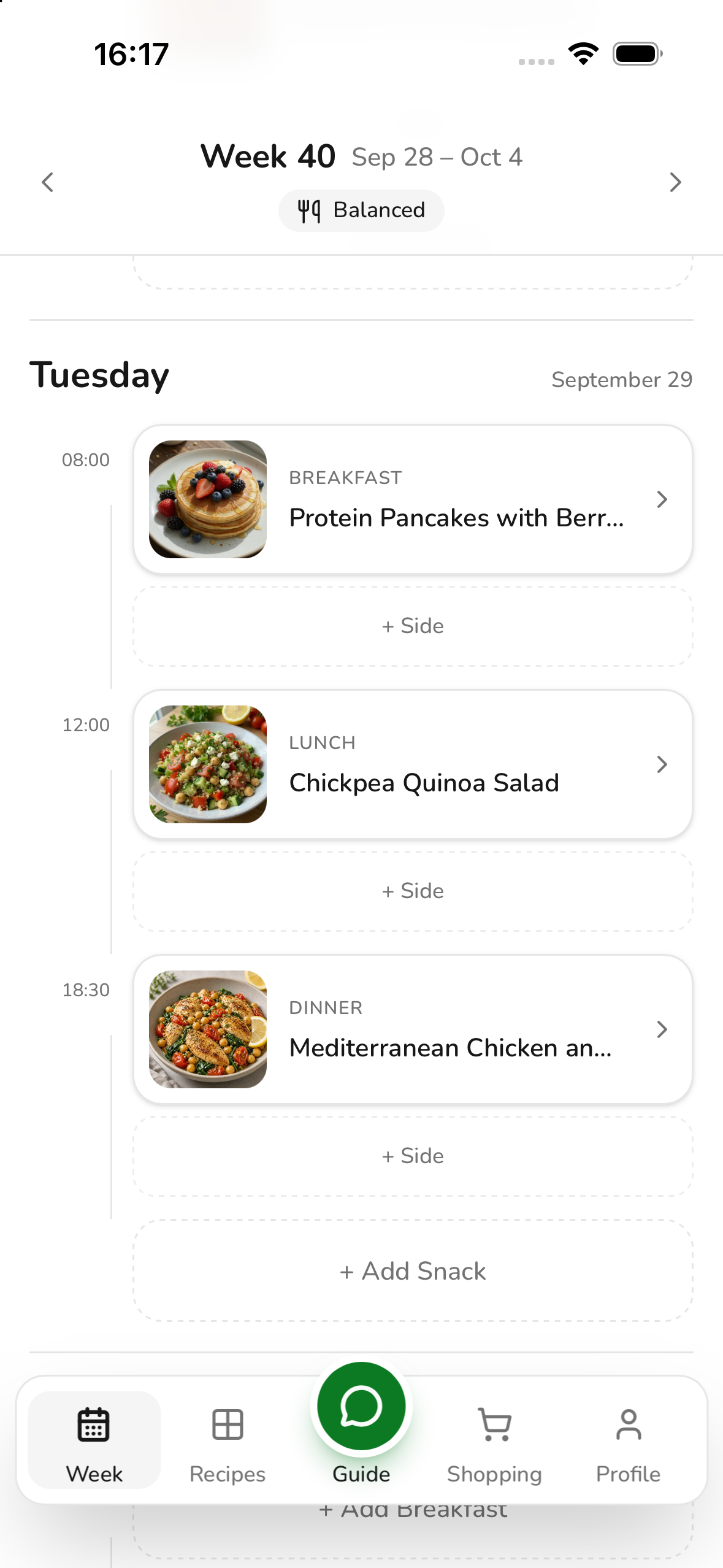
Plan for yourself or your group. Accept suggestions that suit you and swap anything that doesn't.
Plan together - 03
Go shopping.
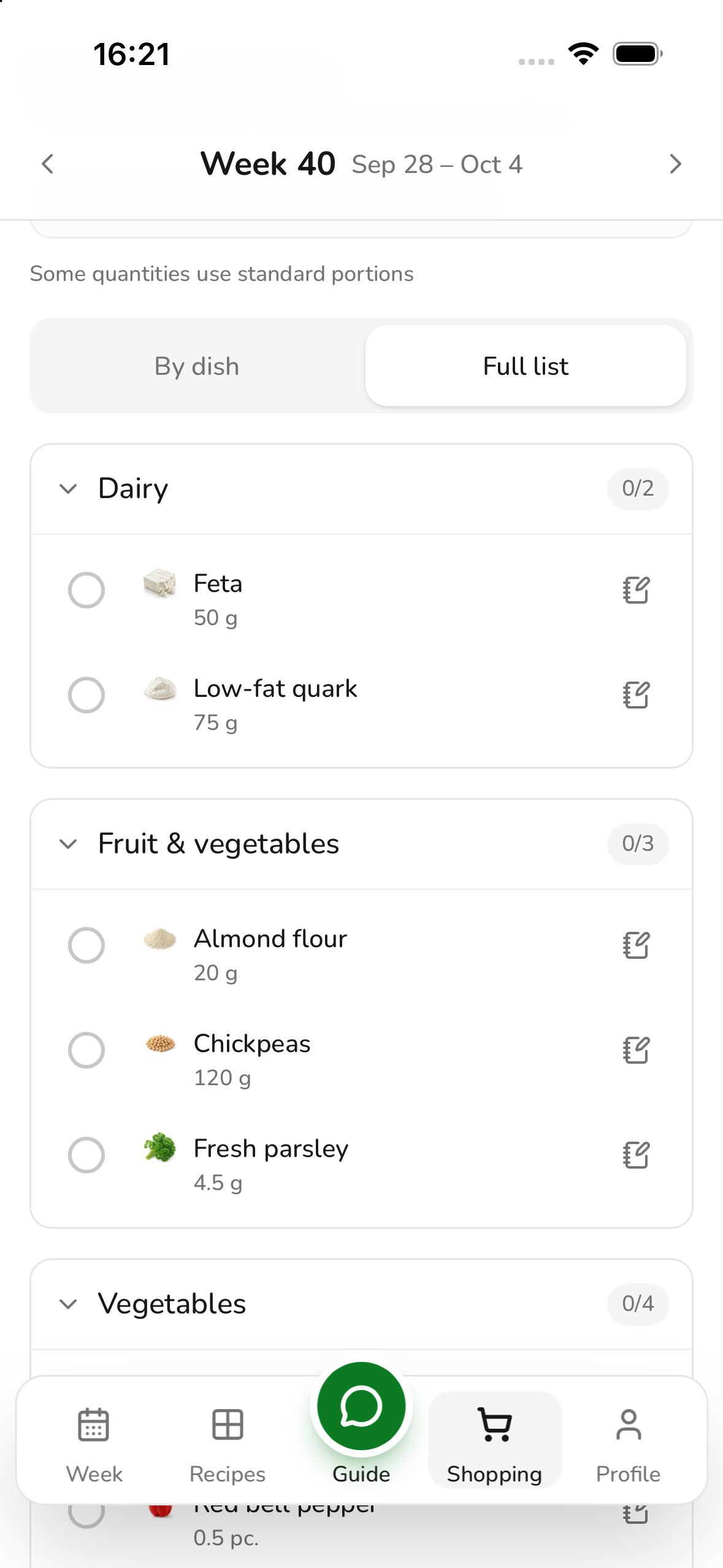
Ingredients from your planned dishes go onto your shared shopping list with the right quantities. Just tick them off in the shop.
Explore the shopping list
Your plan can be as flexible as your day.
A change of plans?
Swap dishes between days. Set which meals you plan and when they take place.
Not cooking today?
Create your own meals such as “Canteen” or “Eating out” once and reuse them in your plan.
Spontaneously ate something else?
Record your food in the plan with a photo and optional note, even without a saved recipe.
You stay in control: every dish can be changed. Planning works without AI too.
The heart of Eatsboard
Your Guide.
Gets to know you.
Thinks ahead.
Your personal AI agent for everyday meals. It remembers your preferences, asks specific questions and takes care of tasks for you: creating recipes, planning the week and logging meals.
It remembers what suits you.
Your tastes, dislikes and cooking habits: the Guide remembers relevant information for later suggestions and learns from your feedback. When important details are missing, it asks specific questions.
It thinks through your week with you.
Let it plan your week or recommend a suitable dish. Just for you or using your group's saved preferences. The Guide also shows unplanned meals and upcoming dishes.
It turns your wish into a recipe.
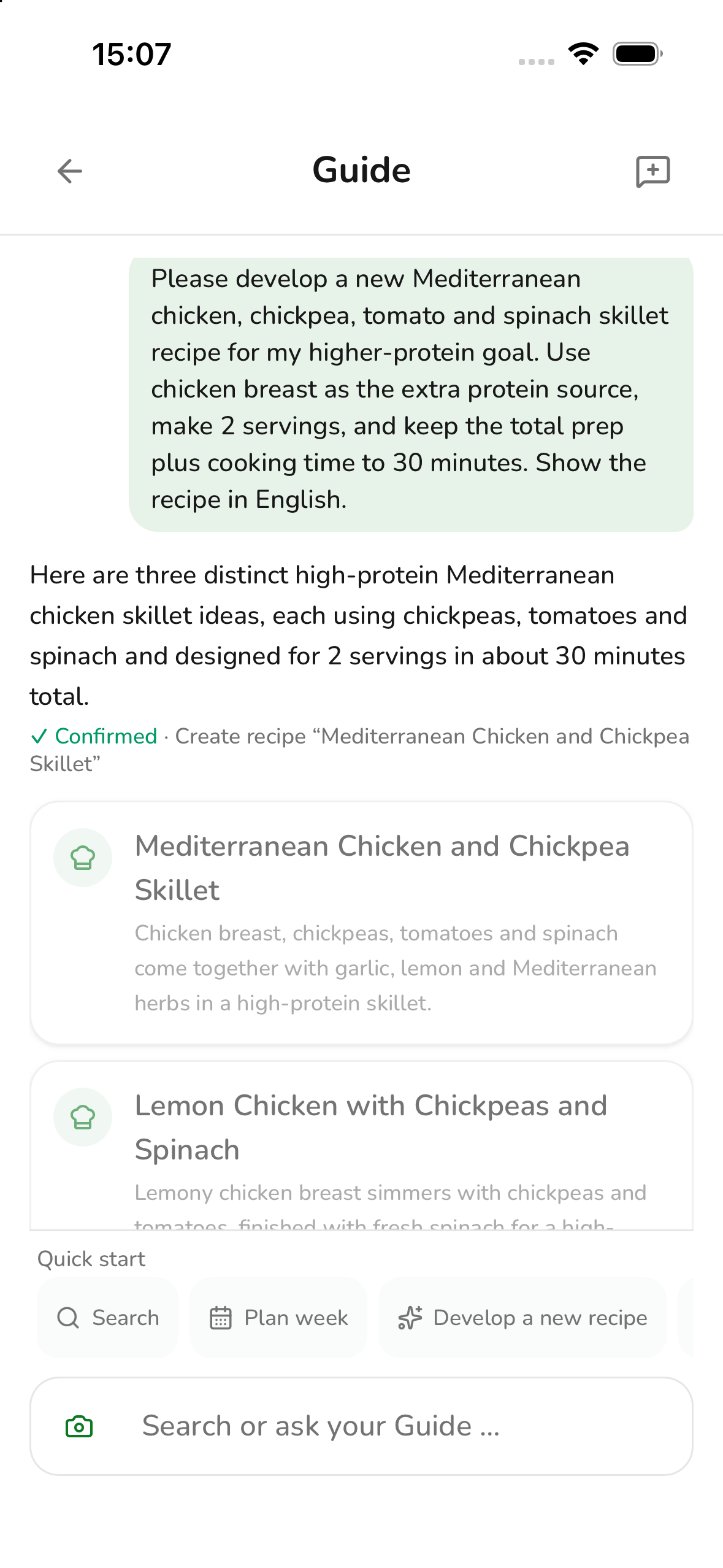
Tell it what you feel like eating or which ingredients you have. Choose one of its ideas and the Guide creates your personal recipe with quantities and cooking steps.
It supports you with your goals.
The Guide takes your nutrition goal into account and helps you log meals. If you grant tracking access, it can also use your diary and daily goals in recommendations.
Ingredients left, but no ideas?
Tell your Guide what is in your fridge. It finds suitable dishes and shows which ingredients are still missing. Or it develops new recipe ideas from your supplies. “What can I make with this?” becomes a suggestion for dinner.
Personal stays in your control. You can review what your Guide has learned and delete notes. You decide on new recipes and changes to the plan.
Explore your trackingThe ideas are already here
Less searching for recipes.
More finding your favourites.
You do not need to build a collection before getting started. Discover almost 500 recipes, add variety to your week and keep the dishes you enjoy.
When a recipe has several cooking methods, choose the one that suits you directly in the recipe.
- Search and filter by cuisine, dish type and cooking method
- Save your favourite dishes and add them straight to your plan
- Cook with ingredients, quantities and step-by-step instructions
Bring your favourite recipe along. Scan a recipe from a cookbook or a screenshot and review the draft. Edit your own recipes and share them with specific contacts or your group.
Goals & tracking
Plan around your goals. Eat with awareness.
Choose a nutrition goal for your plan and, if you like, keep track of what you eat and how your weight changes.
Nutrition goals
Your nutrition goal and saved preferences inform suggestions for lunch and dinner.
- Balanced
- Muscle building
- Weight loss
- Low carb
You can adjust individual ingredients too.
When suitable ingredient alternatives are available, Eatsboard shows them to you. On the shopping list, you can select an alternative for your own share; calculated quantities reflect the swap.
If you have allergies, always check ingredients and allergen information yourself. AI suggestions and nutrition goals do not replace medical advice.
Your personal tracking
-
Your nutrition at a glance
Log meals and compare calories, protein, carbohydrates and fat with your daily targets.
-
Your weight over time
Record your weight and target weight, then follow your progress.
-
Your needs, tailored to you
Calculate your calorie needs from your body profile, activity and goal, or set your own targets.
Tracking is optional. You turn it on yourself; your Guide can only use your diary with your additional permission. Turning tracking off keeps your entries.
For everyone at your table
Eat together.
Keep track together.
“What is for dinner?”, “How many people?”, “Who is shopping?” A shared plan lets everyone see what is coming up. One person no longer has to remember everything.
- Invite family, your partner or flatmates with an invitation code
- Take members' preferences and nutrition profiles into account
- See personal entries and the group plan in one weekly view
- Rate dishes and suggest a swap
- Share a weekly plan and shopping list
A dish does not suit you?
When preferences conflict, you can request a personal alternative or choose another dish yourself. Everyone else keeps the shared plan.
From weekly plan to shopping basket
The plan is ready.
So is the shopping list.
No more copying ingredients or adding up quantities. Eatsboard turns your planned dishes into a shopping list. When your plan changes, the list updates too.
- Automatically combine ingredients from your planned dishes
- Calculate ingredient quantities for personal or shared plans
- Shop by dish or from a combined list
- Check oil, spices and other pantry staples separately
- Tick off purchases on your shared list
- Add other items and notes, even without a weekly plan
Bring your shopping note along. Take a photo or upload a screenshot to your Guide. Review the recognised items and add them to your list. You can also simply message your Guide with individual items.
Good to know
Any questions left?
More looking forward to food. Less thinking about it beforehand.
Your next week
could be more relaxed.
A Guide that gets to know you. Plans and recipes that fit. A shopping list that follows.
Get started for free · Optional in-app purchases For iPhone · iOS 15 or later